Please see the following steps to manage the credit cards you have on file. Please note, a maximum of 2 cards can be added to your account.
-
Log into your Amare.com account, hover over your name in the top right corner, and click My Account.

-
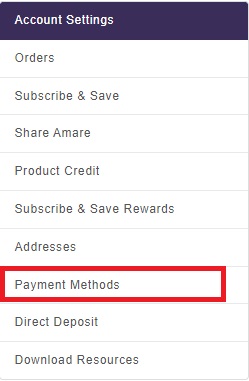
On the left side menu, click Payment Methods.
- Click "Add a new credit card" or "Add a new wallet" to add a payment method. Click the pencil icon to modify an existing card. Or click the trashcan icon to delete an existing card.
- If the card you are wanting to delete is tied to a Subscribe & Save order or your annual membership fee, the card is unable to be deleted until it is no longer tied to your order/fee.

- If the card you are wanting to delete is tied to a Subscribe & Save order or your annual membership fee, the card is unable to be deleted until it is no longer tied to your order/fee.